Two more textures in timelapse. One very easy and the other still easy but a little more work.
– Martin
Two more textures in timelapse. One very easy and the other still easy but a little more work.
– Martin
This is a timelapse of me retexturing one of the Mage Guild exterior sets. This one stayed pretty close to the original and I liked how it turned out. I did later on decide to make the brick darker red for a more striking look.
I have a couple more that I made but haven’t posted. I’ll put those up shortly.
– Martin
Planning
One thing I noticed recently on my work w/ Arena is that I don’t really have much of a game plan other than “finish Wall SETS then IMGs”. Considering how much project management is part of my work, I found it odd that I didn’t implement it here. After thinking about it awhile, I came up with two reasons: 1. When I’m home I don’t want to think. 2. This is my hobby so I have never been too worried about how fast or slow it goes…I just do it for fun. Incidentally, for my Torchlight project, I didn’t have this problem (well not to the same degree). In that project, I tackled one levelset at a time. I marked textures to see where they fell in the game ahead of time and work one of them till I was happy how it looked in game. Only then would I complete all the others in that level set. I even had some of the templates saved for similar creatures to minimize duplication of effort. There was still room for improvement though. I was terrible about writing down and special techniques or tricks that I used. Because of this, if I held off and came back later, I forgot how it was done.
Mission
Realizing this now, I feel their are definite ways to plan a little more accordingly. Hopefully in the next week, I’ll enough time to work out a little design document. It might be the next post, not sure yet. I plan to work out the vision, objectives, goals, etc. It might not make too much difference but I think it will help keep me on track with what I want from this project (and I can develop the habit now so the next project will go more smoothly).
Start strong
As I have stated in the past, one of the most taxing aspects of editing the TES:Arena textures is coming up with a unique take on the image within the constraints of the limited pixel and color count. While I was thinking about my methods and ways to be more efficient, it occurred to me that I don’t appropriately leverage my motivation. For the last 1 1/2 I have been working one texture at a time. This would exhaust my creativity for the day too quickly. I would waste a bulk of my time “finishing” said texture after I decided how I wanted it to look. All of the “fresh mojo” that I had when I started for the day was worn away by the time I got through a few (sometimes one) SET files. This is especially true with the most of the remaining SET files that have no defined look or image (i.e. barely recognizable as any thing but random colored pixels). Not only was that detrimental to the quantity of work completed in any one sitting, but it also deterred me altogether. There were days that I just didn’t have the energy or initiative to try and figure out a new take on what looked like white noise so I just wouldn’t decide to spend my efforts elsewhere.
Shotgun effect
To better capitalize on that “creative fronted”, I tried an experiment. I loaded up 18 SET files in GIMP. Then one by one, I worked on just getting the look I wanted for a small portion, enough to establish the look. I didn’t waste time completing the whole texture as that is really the easy and mostly mundane part. It worked quite well. Using this method, I was able to solidify my design for 16 SET files in just one day (really just a couple of hours). As I said the design is the hardest part with this project, and I wiped out almost half of the remaining SET textures left. Now, if I don’t feel particularly creative but still want to make progress, I can just finish up some of the ones I have already started (template on itself) and if I do…I may just be able to finish the other 16 or so.





– Martin
White Whale
I have noticed on my various projects that there are always one or two things that cause problems (besides technical issues). For my texture mods, this tends to be a (or “a few”) texture that I just can’t find the mojo to complete satisfactorily. Usually when I work on such textures, it just turns into a series of mis-starts and redos. Sometimes (in the case of Arena), it’s that I have an idea of what I want to do but either I struggle with how to make it happen or it doesn’t materialize as I wanted.

Not without a fight
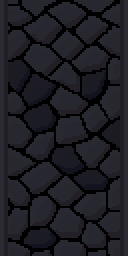
The one texture in Arena has cursed me for almost a year is DWJ02. Don’t let the plain innocent name fool you. It taunted me with it’s ambiguous rocky look. During the many hours I toiled on it (sadly not an exaggeration), I aborted multiple attempts to complete it and in several instances started completely over. It should be noted that this highly specific artist’s block is in no way logical. I can complete several similarly abstract textures in a single day and still would not make much, if any, progress in DWJ02. I think the problem was that I locked in how I wanted to have it look pretty early on but every time worked on it, I just didn’t feel quite right or I felt it looked too similar to other textures.
At last, victory
Last week, I barreled down finally and finished it (despite my son accidentally shutting down my computer when I was 2/3 done with it…curse….curse). The final result is not even a particularly sexy texture, although I do like it, but really that wasn’t the point. The point, obviously, was that I could not let it beat me. I faced my demon and I struck it down. Now what it this DWO02………………
– Martin
WARNING: Potentially boring technical stuff below. Oh and it’s probably unnecessarily long
Whenever I’m feeling a lack of drive to work on a particular project, I tend to stray to something else till that motivation returns. Although I strive to stick to one project, I do need brief diversion to replenish my enthusiasm now and then. Sometimes, that means working on one of my other projects for awhile. Like this week, I took a brief detour back to my Minecraft project. But other times, I just let my more analytical side run wild…..
Distractions
Besides art, I really enjoy the technical aspects of computer programs. I’m perfectly at home trying to decipher file formats and learn out the hows and whys “behind the curtain”. Sometimes it can give insight into the decision-making that led up to some design choice or the other (e.g. how SET files are mostly walls and floors but the outside ground textures are individual IMG files even though they are used in a “SET”-like fashion). Other times, it just gee-whiz knowledge such as Darkstone can handle high resolution texture or that TES:Arena’s root directory is also the file override directory (overrides the files for the game). I freely admit that I just enough to know I don’t know enough. I can analyze files (e.g. using a hex editor to examine the file byte by byte) but not enough to find the answers I want.
A.EXE
That is how I discover odd things here or there about games that I’m working on. Quite awhile back, I discovered that the Arena executable file (a.exe) was compressed. This immediately led to me wanting to uncompress it. It didn’t take me too long to find a dos unzip tool then I just loaded Dosbox then ran the tool from within the dos environment. It was fun for me just to have gotten that far. The executable still worked but it wasn’t as if that opened a treasure box of discovery. The main thing I found was text inside the executable that is used in game however I don’t know if editing it would cause something to break (might be worth trying sometime). Sometimes compression isn’t about size but speed. The computer can load more into memory then uncompress it on the fly. However, that isn’t really relevant to TES:Arena anymore 😉
DOS DEBUG
Occasionally when I’m bored, I load the Dos debugger version of Dosbox. It’s basically the same program that emulates Dos but with a debugging window so you can see “what’s going on in the background”. While I don’t have nearly enough skillz to understand how to copy memory from registers and other such jazz, it has shown me what files were loaded when particular dungeon or city was entered and that has proven helpful a few times already as I tested my mod. I know it’s possible (in theory) to use the debugger to find the routine for the IMG files that use that difficult compression. Also, one might be able to wait till one of those IMG files are loaded in memory (and thus already uncompressed) and then pull it out of the memory register….no idea how to do it though. (I told you I know enough to know I don’t know enough). I would really like to see if the IMG files would still work “uncompressed” but don’t know how to make that happen.
MIFs
All TES:ARENA levels are detailed out in the MIF files while the textures, sounds, etc. that they load are listed in the INF files. Think of a MIF as locations outlined out on graph paper. They determine the layout of all locations: cities, dungeons, stores, etc. INFs are more like the map key dictating what the dungeon will look like aesthetically. With preliminary exploring with a hex editor , I found each MIF has a specific INF listed in it’s “code”. So when a MIF is loaded, it searches for the INF and loads all textures and sounds from that particular file. If we ever manage to decode the MIF format, we could theoretically create new levels and hand design them too. Occasionally, I’ll load one up but honestly, but I don’t get far (it doesn’t mean I can’t have fun trying).
INFs
INFs on the other hand, are all plain text. You’d think that would make them easy to decipher but the format is only partially obvious. I have fiddled with changing pieces here and there to see the effect in game but only a little and I haven’t found much. There are some odd switches that didn’t seem to have any (obvious) effect on the starter dungeon. I will probably map the INF file structure out at some point when I have more time (ha ha). The bigger problem is that I think the INFs maybe loaded with extraneous junk that doesn’t get used in game. For example, the starting dungeon only has one floor and one exit with no entrance but the file not only list an entrance file but also 6 alternate files sets as well a listing of all the monsters in the game even though only a few are used in that level. My theory is that they used a base template to start with then altered it from there. This confuses the matter if a texture is used in game or not if each level list many textures that aren’t used for that level. It could be trimmed down if I we knew what the structure of the MIF files and could see if those listed IMG files are actually used in that level. Maybe in time.
Interior doors
Last week when I was lacking of motivation to work on the walls sets, I decided to fiddle with the interior doors and more specifically the wooden doors. Those are the ones that connect rooms and hallways and not ones leading out of buildings or dungeons. These particular doors are one single texture that is a door (the entry exit ones have borders that match the interior walls). That door occupies one square of dungeon space (all dungeons are square chunks of one texture). While in-game it appears that there are only two or three different wood door textures, there are actually over a dozen. It’s just that there are only 3 different textures among them. Here’s a sample of one image among multiple IMG files:


5 Doors don’t have to equal 1
What I don’t understand is why Bethesda used multiple files with the same IMG when space and memory was a concern back then. They could have easily used one file through the INF files (the ones that decide what textures to use on each level). However, this does give me an opportunity to add some variation to the ingame art. As such, as with walls and etc., I will make each door appearance different.


Color balancing
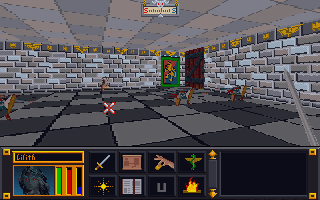
After wandering around in the game, I started feeling a need to go back and tweak some textures. I was just not happy with some of the combinations. Sometimes it’s just best to strike while the inspiration is strong. So I have spent quite a bit of time adjusting colors, cleaning up some of my more “questionable” decisions, and generally making them all play a little better together. I especially tried to tone down the floors and ceiling so they don’t clash or draw away from the walls. Some of the texture combos are much easier on the eyes now. For some of them, I removed the splotches or other weird marks that I had left to stay close to the original…the resolution/texture sizes are just to low to be that craz…er creative.
Breaking away
I have stopped trying to adhere strictly to the source material in interest of keeping the textures unique and fun. Additionally, I plan to add some “detail” to the wall sets that are just a group of plain walls (e.g. a small object on the wall). I want each wall image in a set to be unique but I’ll be sure to keep unadorned walls too to balance the aesthetics.


Ingame appearance
As I have worked on several games, I have noticed various oddities. I have covered one before: unused assets. However, there are a few others. In the game TES:Arena, most SET files are reserved either for walls or for floors. The exception is this one:

Which gives us the below separate ingame dungeons:

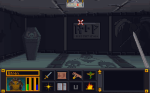
So far, it’s the only SET file to do that. Not sure what happened or why it’s like that. The main challenge with is that while I liked it on the floor against the dark walls, I don’t care for it as a wall texture. I’ll have to go back and tweak/balance it later. In theory, with further modding of the INF files (they determine which art files each level uses), it can be made so that a different file is used but I’m not inclined at this time to do that.
Ummm…what
Right off the bat, I’ll admit that my “working” copy of TES:Arena has been in use since I first started this project (several years now). It is now a Frankenstein-mess of my experiments. I expanded that executable file with an ancient program, expanded all the resource files, installed “WinArena” over top, fiddled with the INFs, etc. So I don’t know if the weird things I see in the game are my fault or not (easily enough to verify but I don’t really care that much).

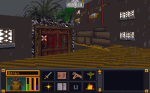
I even had a very odd problem of an Imperial City textures completely changing from one style to another. I just walked into a mages guild and came out to a completely different looking city. I wished I had made a video of that weirdness.
-Martin
Why Arena?
*This post was originally drafted in 2012 but never submitted. I have revised and updated it.
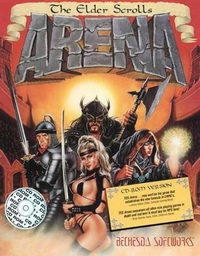
The next brief diversion was an even older game called The Elder Scrolls:Arena. It is the first game in one of my favorite video game series and I did play this one a lot when it first came out in ’94. I found a website that packaged it (and it’s sequel) in a neat, easy to install package. But, the low resolution graphics (320 x 200…trust me it’s very low) were so pixelly that it was hard to play and enjoy for me, particularly in the cities where anything in the distance was just a blob of small blocks.
Mods?
After some quick checking, I found that there were NO graphic altering mods out there. No one on the forums seems to think it was even possible. I found that hard to believe and felt the “challenge bug” nibbling at my toes. I wanted to find out how to do it. But I only got as far as checking how the files were stored (container file ending in .bsa). I did find that someone attempted to remake the game (didn’t get finished). It claimed to allow you to extract the art file out of the BSA file for you. BUT in actuality, it converts them to a common image format that the original game can not recognize and thus was not a viable option. Due to real life busyness (yes I mean busy-ness), this too faded to the background. Eventually, I did come back to it later (much like Darkstone) and succeeded in extracting all the files (using a old program).


You did what?
Even though the image files were not in any common standard format, I figured out how to open them in GIMP (free editing software). This involved loading the images as RAW images with a offset header of 12 (think “ignore first 12 bytes of file”) and then loading a special palette files. I could then save it as a RAW image. The drawback to this method was that for images that had the 12 bytes that needed to be ignored (all the IMG files), the saved image wouldn’t have those bytes. That meant that I had to (BRACE YOURSELF) open the file in a hex editor (think super nerdy ), copy all the bytes, then open the original file and paste the copied bytes over starting at byte 13. Then, I tossed that file in main file directory as the game. The only way to see how it worked was to load the game and look for the texture. It was a overly cumbersome process that eroded my enthusiasm and by the time my “interest” (i.e. attention span) waned, I only completed 8 textures. Although I moved on to a different project, I came back once in a while to do a texture or two. I deluded myself in thinking that over time (probably decades), I would eventually finish it.
Progammer in Shining Armor
It wasn’t until Hallfiry released his “Arena Modding Suite” that the project took off in a major way. His tool not only unpacked the entire BSA resource file (BSA = Bethesda Softworks Archive) but converted most of the textures into PNG files for easy editing. Afterwards, it could be used to “repack” the BSA easily without destroying the “working folder” and converting the files back to the original format. Besides some textures that used a funky compression, it had removed the technical barriers to changing images in the game. Now to date, I have completed 126 of 172 SET files (wall texture sets) with 12 additional ones that aren’t even used in game. The two biggest challenges for me now are: making unique interesting textures that work well in game (after having already made 126 of them) and figuring out how to do some of the more organic textures to match my style (since the pixel dimensions are very limited). 64 x 64 does limit the amount of creativity I can use.


 Art In Pinkerton