Tag: textures

  • RETRO POST : The long road to Arena

    Why Arena?

    *This post was originally drafted in 2012 but never submitted. I have revised and updated it.

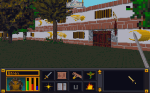
    The next brief diversion was an even older game called The Elder Scrolls:Arena. It is the first game in one of my favorite video game series and I did play this one a lot when it first came out in ’94.  I found a website that packaged it (and it’s sequel) in a neat, easy to install package. But, the low resolution graphics (320 x 200…trust me it’s very low) were so pixelly that it was hard to play and enjoy for me, particularly in the cities where anything in the distance was just a blob of small blocks.
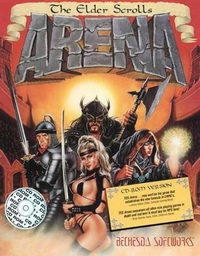
    ArenaBox

    Mods?

    After some quick checking, I found that there were NO graphic altering mods out there. No one on the forums seems to think it was even possible. I found that hard to believe and felt the “challenge bug” nibbling at my toes. I wanted to find out how to do it. But I only got as far as checking how the files were stored (container file ending in .bsa). I did find that someone attempted to remake the game (didn’t get finished).  It claimed to allow you to extract the art file out of the BSA file for you. BUT in actuality, it converts them to a common image format that the original game can not recognize and thus was not a viable option. Due to real life busyness (yes I mean busy-ness), this too faded to the background. Eventually, I did come back to it later (much like Darkstone) and succeeded in extracting all the files (using a old program).

    You did what?

    Even though the image files were not in any common standard format, I figured out how to open them in GIMP (free editing software). This involved loading the images as RAW images with a offset header of 12 (think “ignore first 12 bytes of file”) and then loading a special palette files.  I could then save it as a RAW image. The drawback to this method was that for images that had the 12 bytes that needed to be ignored (all the IMG files), the saved image wouldn’t have those bytes. That meant that I had to (BRACE YOURSELF) open the file in a hex editor (think super nerdy ), copy all the bytes, then open the original file and paste the copied bytes over starting at byte 13.  Then, I tossed that file in main file directory as the game. The only way to see how it worked was to load the game and look for the texture.  It was a overly cumbersome process that eroded my enthusiasm and by the time my “interest” (i.e. attention span) waned, I only completed 8 textures.  Although I moved on to a different project, I came back once in a while to do a texture or two. I deluded myself in thinking that over time (probably decades), I would eventually finish it.

    Progammer in Shining Armor

    It wasn’t until Hallfiry released his “Arena Modding Suite” that the project took off in a major way. His tool not only unpacked the entire BSA resource file (BSA = Bethesda Softworks Archive) but converted most of the textures into PNG files for easy editing. Afterwards, it could be used to “repack” the BSA easily without destroying the “working folder” and converting the files back to the original format. Besides some textures that used a funky compression, it had removed the technical barriers to changing images in the game. Now to date, I have completed 126 of 172 SET files (wall texture sets) with 12 additional ones that aren’t even used in game. The two biggest challenges for me now are: making unique interesting textures that work well in game (after having already made 126 of them) and figuring out how to do some of the more organic textures to match my style (since the pixel dimensions are very limited). 64 x 64 does limit the amount of creativity I can use.

  • Sometimes the baby is just ugly

    Wandering the land

    I spent some time this week searching in-game for textures yet to be done using a pre-edited overpowered save file so I could roam unimpeded. I looked for dungeons, cities, wilderness, etc. that hadn’t yet been retextured. The side effect to this is that I found places where the textures WERE done but I had never seen them in-game or at least not in combination with other textures. From this I learned that some textures don’t work as well in-game as I hoped.

    Proud Poppa

    However, there are many that I feel are just right (or close enough for me to be happy). These I feel keep a unique appearance AND work well not only for their intended purpose but also with other textures. For example:

    Avert your eyes

    Of course, they all can’t be winners. I expected that I would have to go back and tweak later, but some textures combos were just horrible. To be fair to myself, I had two limitations: one, I was trying to make each texture unique and two, some textures were awful to begin with (one of the mage guild textures is a complete mess). These will be easy to tweak up though as all the hard work is already done.

    Dirty walls and floors

    I have starting tackling some of the vague pixelly mess of some wall and floor textures that I have been avoiding. The limitations on resolution and colors will probably force me to deviate from “source” more than I care but it can’t be avoided. There are so many in the DW series alone (A through S). The reason I started looking for textures in-game was so I could see the context in which the textures were being used.

    – Martin

  • Darktone…another old (but not abandoned) texture mod

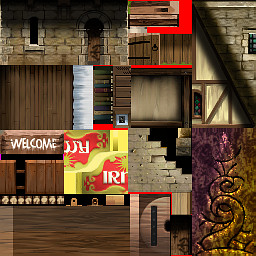
    While I haven’t found my most recent version of the Torchlight mod, I did find my proof of concept file for a texture mod of the pc game Darkstone. Although all the Darkstone media assets are stored in “container” files like my other projects, Darkstone art files are a little different when extracted. Unlike Torchlight and Morrowind that have individual files for each image, Darkstone has what I call “image sheets”. I posted about it before but that was quite some time ago. Basically, it means that one “sheet” will be composed of many images fit together like a puzzle and in reality is actually a dozen or so art assets in one “sheet”.

    Town building image sheet for Darkstone

    Town building image sheet for Darkstone

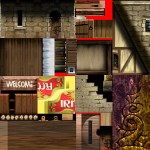
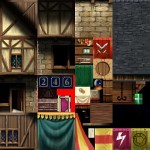
    Arena and Minecraft “sort of” do something similar. Both of them use a combination. Arena has multiple file types for art assets (some undecipherable) which include IMG files (single image) and SET files (multiple art assets stacked on top of each other in one picture). Minecraft *has/had individual files for items and such and one big image sheet for all environmental “blocks”.

    *Newer versions of Minecraft are all separate image files

    The difference in the Darkstone “image sheet” is that all images are not the same size. It takes a little extra experimentation to figure out where some textures start and where some end especially for textures like grass and sand that blend together naturally already as it is.  Depending on my needs, I’ll either use the solid blocks of color or shapes (number, letter, etc).

    As I said, my Darkstone work was merely in the proof-of-concept stage. I had only completed 1/2 of one texture sheet. It was enough to redo some grass and road as well as the trees of only the beginning town (textures aren’t shared across levels). After finding my “sole” texture file, I fiddled with a little and worked on the rest of the grass and road for the level (which included a second image sheet) . However, it is all in the draft stage and needs major cleaning up before I would be happy with them.

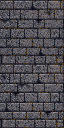
    I have revised the cobble stone to be less “busy”. I tried to use the same style as the other colors (outlines lighter than interior color) but the game keeps altering the colors so I think it can’t handle subtle shades of gray and black. Whenever I get back to this project, I’ll clean up the lines and make sure the grass isn’t so…squiggly.

    – Martin

  • The evil bookshelf of blurring +1

    Arena Depixelation Project (ADP)

    I made a lot of progress on the SET files and a few of the image files. However, I have decided to not count the files as often so as not to distract from getting work done. The Surface Pro has really allowed me to capitalize on downtime away from the main computer. So when I just want to sit with the family while they watch a show, I can work on more art files for the game. I’m trying to complete most of the simpler defined (and geometric) sets first since they require less “artistic license” to complete but every now and then I tackle a more  difficult one (e.g. sand, gravel, swirly designs, etc.)

    Bookshelf

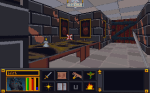
    So far the most involved SET file has been the bookshelf ( actually 4 bookshelves in one SET). The original was awfully blurred and visually unappealing all around up close. It’s one of the more obvious examples of artwork that was created at a higher resolution and then downsized (sampled?) to fit the game engines format and palette. I have been working on it on and off between other images for 2 weeks now and have finally finished. As with all my textures, I hope to retain some of the character while “cleaning” up the image or adding a more artistic appeal (you’ll need to click on the photos for a better view of the difference).

  • From Darkstone to Arena

    After getting the art files “extracted”, I expermented some with changing them using GIMP. For Darkstone, the art files (particularly for the ground and buildings) were a single picture composed of many smaller pictures.

    The game engine would know that if it wanted image X it would have to look at a specific piece of art file Z. This meant when I wanted to change one art asset, I could edit 16 different ones at a time. To test it out, I would just draw a letter or number in a huge obvious way on top of the exisiting art for each distinct section. Then when I loaded the game and look for where that letter or number appeared in the game.

    The problem I ran into with Darkstone was the changes didn’t take at first. I had to troubleshoot why. It turned out to be a issue with how the file was saved.  Darkstone required textures to be saved without any file compression. I simply had to resave the file “uncompressed” and it worked. With Darkstone, at that time I didn’t have any clear direction for what I wanted to do. It was more of a trial run to see how it all worked. Experiment done, my attention drifted away from Darkstone. It was more an issue of time since I didn’t have much so I would work on this a little here and there when I felt like it. Though later I would come back to Darkstone with a more focused purpose.