Blog

  • Houston…we have liftoff

    Alpha status

    TWCRYPT
    Last SET file!

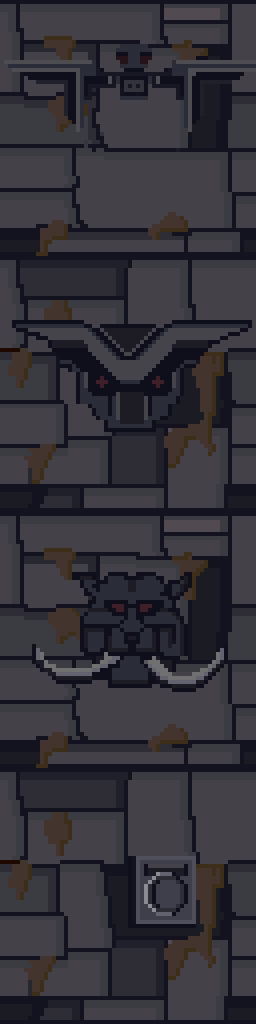
    I have just finished the last SET file for TES1:ARENA. The SET files include the artwork for most walls and some floors in the game. With the completion of the the last one, ADP (Arena Depixelization Project) has reached Alpha status.

    Doors and more

    Of course that doesn’t mean I’m done, I still have to finish the remaining walls and floors that are IMG files (the other image type that Arena uses for in-game static graphics. The doors are much simpler (and less abstract) than the SET files. Additionally, IMG files are a single image as opposed to the 3 to 5 images stitched together that composed a SET file.

    Furthermore, many of the exterior doors borrow from  their “matching” SET file for wall surrounding the door. This should be a simple matter of loading the SET file, coping a picture and pasting as a background layer for the door. I have completed many IMG files, but there are still many more.

    Upload to a site near you

    Now that I’m in Alpha, I plan to upload the initial mod, hopefully, within the week. Naturally, I will clearly state the unfinished condition. I just believe this would be a good chance to get some critical feedback. I already know that I am no longer happy with some of the textures but am resolved to get to Beta before I start tweaking my work too much.

    We have a tech upgrade?

    A while back I started subscribing to Adobe’s Photoshop plan but haven’t used it yet. For the most part, the projects I was working on had time constraints that discouraged me from experimenting in a new program. Photoshop user interface and ways of functioning are different than GIMP (although both can produce similar results). Now that I don’t have any pet projects outside of my own interests, I figure this is a good time to start. This is especially true with converted IMG files which are very simple (kind of like “hello world” for programming.)

  • Overdue request but the Mailman is IN

    Introfix

    After much wait and anticipation (more like I completely forgot to release it), TES Arena IntroFix is complete and can be downloaded here:

    http://www.nexusmods.com/tesarena/mods/4/?

    In this mod, I fixed three slides from the intro when you select new game.

    3-Card monte

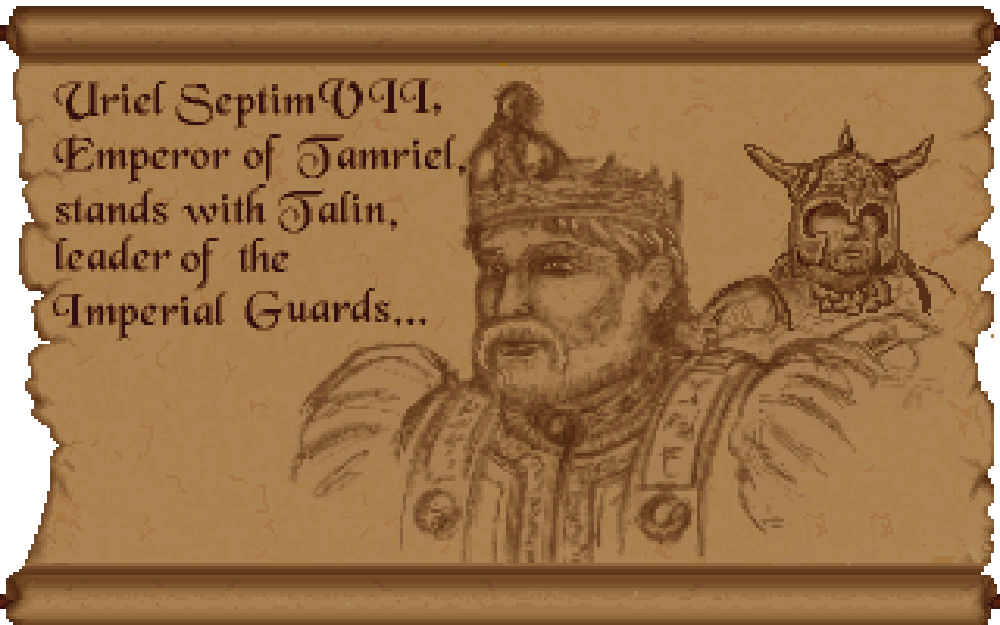
    I had completed these some time ago but forgot to release them. Unfortunately, my file managment has been less than stellar and it took awhile to find them again. When I did, I noticed that there were still a couple of errors that needed fixing. So I fixed them and now no one need ever suffer under Uriel Septim IV’s oppressive need to steal the limelight from his great grandson.

    Uriel is an odd family name

    INTRO01t
    Uriel Septim VII is rightfully restored.

    Once I had the textures in PNG format (a common image format), fixing the slides was a matter of several well placed cut and pasting.

    However, getting them to a PNG format was more of a challenge. I had to use Arena Toolbox by Dysperia. That tool is a fantastic counterpart to ArenaModdingSuite. One of it’s unique functions is that it can convert the compressed images into PNG. Before this tool, no one knew how to uncompress those images (there are quite a few).

    One hidden feature of the program is that it allows you to import the palette file (where it determines color) into the image itself versus being external to the file in the root directory. To make it work though, you have to trick the program into thinking it’s a new image. Simply adding a letter in the filename sufficed. The Toolbox can also convert back to the native IMG file.

    Last thing left was to test it. I dropped my 3 new IMG Intro slides into the root folder of Arena, booted it up, and IT WORKED. Awesome. Sometimes it’s the little wins that keep you going 😉

    • Martin


  • State of the Blog 2016

    Went away

    I know, I know. I have been away for some time. 2015 was a very difficult year in the non-digital realm and some things had to slide to offset the stress.

    Came back again

    However, despite my my absence on this blog, I was actually quite busy on the graphic arts side of the house. I either oversaw or personally completed several projects for coworkers and friends. One of which, I am extremely proud of (more on that hopefully in a future post…i.e. one that isn’t written late at night when I should be sleeping).

    It’s all fun and games

    While I didn’t really work on the Arena Depixelization Project too much (it had to slide too), I was involved with design aspects for a couple of mods focusing mostly on 3D layout & set design and got some interesting practice on cooperative project management as a graphic artist/designer. I even every so slightly fiddled with 3D modeling.

    Accelerate to 88 mphs

    I have Photoshop now, guess I should actually work on learning how to use it.The problem is that I’m so used to GIMP, Photoshop seems downright alien to me. I imagine my warm up period will probably not be the speediest.

    I want to experiment a little with my art projects. I am thinking of “remastering” some of my very very early and juvenile (i.e. decades old) artwork. I don’t know how it will turn out but at minimum, it seems like a interesting experiment.

    Another similar idea I read about was to take kids artwork and reimagine it. I have a lot of that lying around from over the years and that just seems like a fun concept.

    I guess we’ll see what the year brings but overall I feel healthier happier and more like my old self. I miss my old blog…and I seem to hear a certain collection of 64 x 64 pixel sprites calling my name ;

    –  Martin

  • WASD?! Watch your mouth!

    Moving in 1994

    TES: Arena was made back in day when the WASD key combination for movement wasn’t used much (if at all) and most movement keys defaulted to the “arrow keys”. In addition, the ability to remap the keys in a game was fairly rare too.

    SIDENOTE: WASD = W – forward, A – backward, S – slide Left, D – slide right. In variations without mouse-look, “slide” is replaced with “turn”. This is pretty much the defacto standard today due to being able to control movement with the left hand and mouse with the right.

    It’s been there all along

    For the Arena Depixelization process, I have done a lot of “in-game” checking of textures. The controls always felt unnatural to me even when the game was popular, but I put up with it. Later when DosBox became a popular way to run old Dos games, it included an ability to “remap” the keyboard keys. So in theory, you could move the keys functions around (e.g. map the arrow keys to the WASD setup. The problem was that this mucked up the assignment of letters and makes typing words and text (such as naming spells and save games). I tried the new setup a couple of times but didn’t really “get” DosBox’s key mapping tool very well.

    Left doesn’t equal Left

    So earlier in May, I had enough and decided to really try and make something work. In a short period of time, I discovered that the key remapping tool in DosBox was actually pretty versatile and the method it used allowed me to employ a trick that would fix the “typing words” problem and still have an optimized control scheme.

    Basically, after remapping all the keys, I assigned one key “L Alt”  as a master default key. This meant that anytime the Left Alt key was held down, ALL keys assignments reverted to normal behavior. For a game light on text input like Arena, this is a pretty elegant solution to the problem AND it works really well in the game and feels quite natural once you learn the key assignments.

    I uploaded the files to the below two sites.

    Moddb

    Nexus

    What’s this doing on an art blog

    There was some graphic arts to this although hastily done and not quite as nice as I’d like it. I wanted to include a nice key template that laid all the keys out in an easy to understand and intuitive way. First, I scoured the internet for a decent picture of a keyboard (scoured = googled). After cleaning the image up a little, I added text box labels for every in-game key (including the few that I didn’t remap). Then I simply highlighted those keys with the paint bucket fill option and made all non-game keys a dull gray.

    New control scheme
    New control scheme

    FUN FACT: There are several “new” keys that didn’t exist in the original game because the function only worked with a combination of keys before; such as there is now a long jump key as well as the regular jump (regular jump is really just hop in place), a world map key separate from the local map, a recast last spell key and slide left and right (which was only worked before by hold “.” and pressing a turn key)

    All in all, it only took a few hours to get this done and now not only is it easier to test in game, but others can download this and use it for their game.

    – Martin

  • Is that 80’s fashion?

    The straight and narrow

    Some days I can blaze through images getting 5 or 6 done in a sitting, then other days just part of an image can take a couple days. When it comes to the Arena Depixelization Project (ADP), the easier ones are just patterns (especially ones with straight lines horizontal or vertical). The low pixel count doesn’t really muck up the design too much since there is no need for a “fine detailed” line in those cases.

    It kind of looks like….

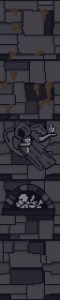
    However, once lines start curving or the image becomes complex, the time required is increased, sometimes dramatically. It’s hard to get non-angular shapes to look good when you only have a 64×64 grid to work with. I find that it takes multiple revisions to get it looking just right. To make matters worse, the source material for ADP contains many pictures that are either so pixelated as to be barely discernible or they generally don’t look very good as you clean them up (such as dress thing for the “angel” in this picture).

    WALLA Untouched
    Click to enlarge


    Close enough for horseshoes and hand grenades

    In that image, I had to make some artistic decisions on how “accurate” to the source material I would be. The image is generally too complex to leave unaltered for my “Depixelization” theme. At first, I didn’t even know how to tackle it. I completed all the background wall first and left the “Angel” and the “alcove” till last. The good thing about that is that it let me establish the colors for the image. Eventually, I had to do this one as I only have a few SET files left. I decided to break it up and focus on individual pieces of the angel. I really wished I had made a timelapse of this one to show how much back and forth I did on it.

    Mr. Potato Head

    I started with the more clearly defined shapes, to include the arms, head, and the key. Those came into place with minimal fuss. Then, I tackled the wings. It took me awhile as the initial version (closer to the source) just didn’t look very good. After a couple of iterations, I ultimately decide to make the wings bigger as if they were more full body sized. Next, I attempted to do the feet. However, they just did not look good, especially when I started working on the weird “billowed” dress/robe. I decided to put the feet off and do the clothing. I touched up the sleeves to improve the “hanging off the arms” appearance. I made my first rendition of the lower part of the robe very close the source version. However, it looked terrible because the source version is kind of ridiculous looking, as if someone tucked an oversized shirt into a skirt.  I played with it a little before I decided to just alter the design. I revised it to look more like a regular robe. Unfortunately, the feet still looked awkward, so I removed them and lengthened and curved the robe as if they were hidden by it and it was floating.

    – Martin

    ADP WallA
    Click to enlarge


  • Picking back up the brush

    Who’s down with ADP…yeah you know me

    After a substantial hiatus for real life, I’m back. My schedule has a lot more free time in it now and I should be able to make substantial progress on the Arena mod in the next few weeks. As of now, I am just 2 or 3 SET files away from reaching ALPHA! Once that is complete, I will be setting up a MODdb page and probably trying to host it on the Nexus mod site.

    The project will stay ALPHA until all door and ground files are done. I do hope to have all the font files and interface done too, but that is more of a nicety (most are already done though). Once ALPHA 2 is out that I will be going back and reevaluating each texture. I started this so long ago and have come quite a ways that some of them are not to my standard or vision anymore. As it is already, I occasionally retool one here and there but I plan to do a comprehensive review.

    Taking the plunge

    I finally gave in and purchased Photoshop (well subscribed really). I don’t anticipate being very proficient in it for awhile since I have been using GIMP for years and it’s so different. For the Arena project, this isn’t really a problem. It doesn’t require fancy functions. I am literally coloring individual pixels from a 256 palette. The biggest obstacle their is my creativity and not the tools.

    Some recent work below (really like how the first one turned out)…

    – Martin

    WALLH MINEA MINEE WALLG

  • Wake up! You were dreaming.

    Early on

    Morrowind Main Menu (Original)
    Morrowind Main Menu (Original)

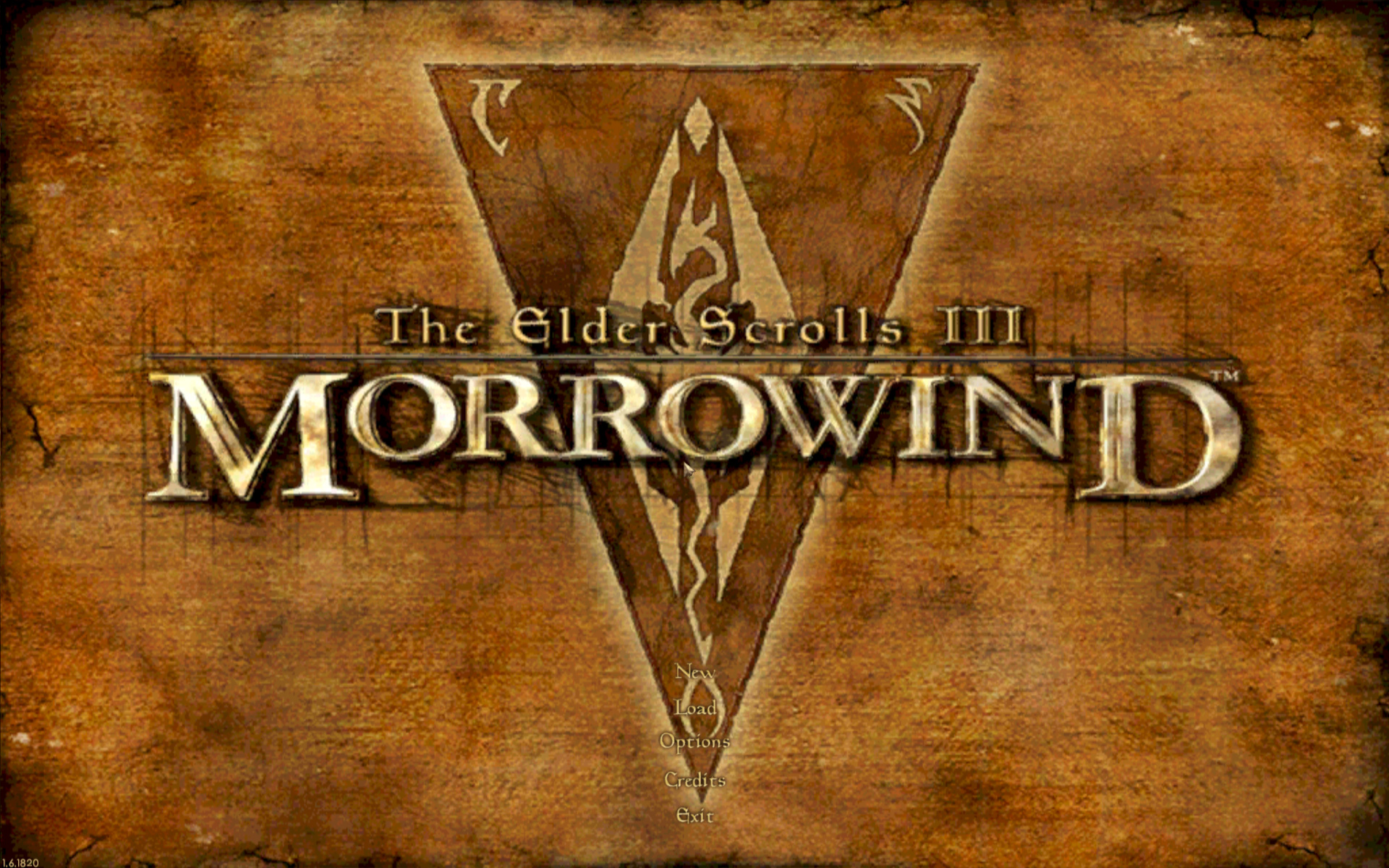
    Back about 4 1/2 years ago, I had just gotten into computer graphic design. I spent the first 1/2 a year experimenting and learning how to use the editing software (GIMP). One of the games I messed with was Morrowind, my favorite game. It wasn’t really meant for any project. I decided to make a desktop wallpaper of the main menu.

    At that time, I didn’t know much about GIMP or how to use it effectively. Additionally, I had just gotten my Wacom tablet and hadn’t become comfortable with it quite yet. To make it easy, I used the original Morrowind main menu texture as the base. Because of this, the end result was (and still is) useable in-game. I even went as far as retexturing the New/Load/Save buttons to match the theme.

    Morrowind Box Art

    It’s Alive

    I decided to use the box art as a supplementary inspiration when I began working on it. There were some key differences between the two; the major one being the border that framed the box art. I really liked the border and the “daedric” lettering on it. Unfortunately, my source copy of the box art wasn’t very good so I had to guesstimate when recreating them.

    Crayola version

    I did have a couple goals in mind with an overarching theme of applying a cleaner more art-lik

    • To boost contrast, the border was darkened and a similar color was used for the middle triangle.
    • The center was lightened with a complimentary but vivid color to liven up the image.
    • The “daedric” lettering was lightened up to look more dramatic and almost “glowing”.
    • A spot of white was placed on each “letter” and then the smudge tool was used to stretch that white color into highlights.
    • A level of depth was created by adding width and darkness to the inner edge of the frame. The “Morrowind” lettering was giving a simple perspective by adding a drop shadow angling to the lower right.
    • The dragon emblem was subdued so that it didnt’ overpower the wording. This also gave a subtle layer of interest.
    • Lastly, it hard to see but the entire image was given a paper texture filter to create a painted canvas feel.
    I use this as my background on my computer for inspiration
    I use it as my background on my computer for inspiration

    You never forget your first

    Most of these effects evolved through experimenting with the software and various visual styles that I had in mind. However the whole picture was hand drawn/partially traced using my art tablet. It’s not without it’s flaws and a level of crudeness to the picture shows my inexperience at the time. Despite all that, it is one of my favorite personal pieces because it’s the first complete computer graphic design work of mine.

    – Martin

  • It’s getting hot in here AGAIN?

    It’s getting hot in here AGAIN?

    Warm to the touch

    NOTE: This kind of a rehash of a previous post from a different angle (slightly) that walks through the process more “visually”.

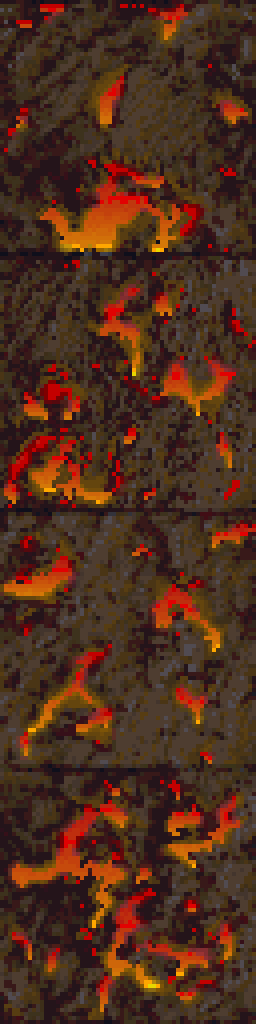
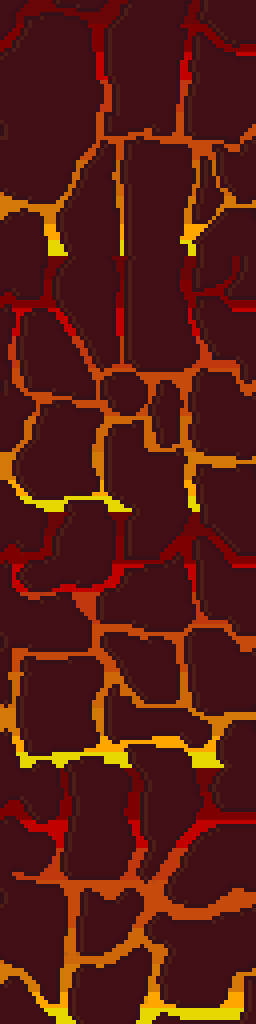
    One of the texture SET files edited recently for ADP was a 4 texture wall set that resembled a wall with lava or fire spots. I had already settle on using a mostly flat wall color to more dramatically contrast the flames/lava parts of the textures. But in order to maintain a uniform look to the fire, the image needed to be built in layers. A good first step is to make a duplicate layer of the original before making any changes, especially major ones. That way, the duplicate can use as a reference when editing the image.

    MINEB1 (original)

    • Layers in GIMP (and I’m sure Photoshop) allow you to create/edit different pieces of a picture individually but still be able to see them as a whole…like may layers of tracing paper stacked together but each having a different element drawn on it.

    Cut it out

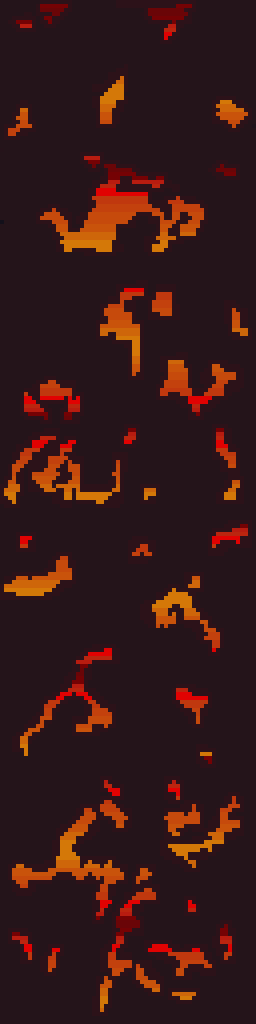
    In this instance, the first element designed was the “wall” layer. Using the Erase function, all spots containing a decent amount of fire were erased.  In GIMP, the eraser needs to be set to “hard edge” because of the technical limitations of the image format, it can’t deviate form the original palette or be partially translucent. Later on when the “fire” layer was created, it would be placed underneath this layer so that it show through only the holes.

    MINEB1 (foreground)

    Sticking to colors in the image, one was chosen as the new wall color. Before mass painting the “wall” (usually just by increasing the pencil/brush size to larger than the image), the “lock” transparency option had to be enabled to prevent the cutout holes from being filled in. Lastly, another complementary color was used to border the cutout sections and add a smidge of depth and interest.

    Heating it up

    Next, another layer was created for the “fire”. The plan was to fill the whole layer with the fire effect. If the “wall” layers transparent parts are changed (holes made bigger or moved), it wouldn’t need any adjustments. Also, it’s just easier that way. The fire is created by using alternating gradients of yellow to red and then back. This is repeated for the whole image.

    MINEB1 (fire background)

    Lastly, the final step is to “merge” the two layers together so that they show the wall but with spots of fire. In GIMP, you can right click the “wall” layer and just select “merge down”.

    MINEB1

    This technique is very similar to the one used on another firery wall that I completed months ago. Additionally, I used it for the lava in my Minecraft texture pack.

    MINEA1

    It’s fairly simple but still creates that fire/lave effect I like despite the limited palette.

    – Martin

  • “I’m not dead yet!”

    Not quitting

    Real life (RL) hits most enthusiast artists and game modders extra hard at some time or another, as it did me (I had the trifecta of work, family, and computer problems). Since most of us do this for fun, we have fit it into our leisure time. Some days, there is practically no free time. But more often, there is time but because of RL, the mental (and/or creative) juice isn’t there. For extended periods of “down time”, the bigger danger is that the interruption and loss of creative motivation might lead to loss of interest in a project altogether. This is especially dangerous for larger projects where the modder/artist might reflect on the enormity of the work that still needs to be done or if a newer shiny bauble attracts them.

    Motivation

    The source of motivation plays a big factor in overcoming this kind of stagnation. In my case, the motivation is internal based (i.e. I do mods that I want to see). Additionally, I’m not modding current games so the pressure from the community isn’t a factor either. My projects are my COUNTER to RL stressors. I relax when I’m editing pixel by pixel. Each of my projects is an experiment in artistic design for me.

    The Torchlight mod was my first real art mod and there are many things I look back on that showed my inexperience. However, I actually get energized at the thought of seeing how it would look now that I’m (slightly) more skilled. I guess what I’m saying is that if you do projects for yourself first and you enjoy it, it’s more likely that you’ll come back after these “unplanned pauses”. I’ve been working most of mine for several years (on and off) and haven’t ever considered abandoning them.

    NOTE

    I originally planned to detail my work on some fire walls for Arena but this kind of just happened. Since I want this webpage to chronicle my artistic processes, I rolled with it. Long story short, sometime this week I’ll do that post 😉

    – Martin

  • Dude, where’s my post

    Slight pause

    Due to a fairly high RL tempo at the moment, I haven’t been able to work on ADP for a little while. I foresee having a little more time by the 2nd week of December. I don’t care for extended delays (well more than a month) so as soon as I can, I’ll be back at it. I’m eager to finish ADP and start my next (on hold) project.

    Who told them?

    I created this website so I can chronicle all my artistic  (and design) endeavors, not just game related stuff. However, I haven’t been highlighting my other artwork. I get asked occasionally by friends to create images now and then.  In that vein, I am going to create a general art section and will similarly list my thought processes and/or techniques behind how I created each image. Additionally, I want to do a retro section of old (some pretty juvenile) artwork from my younger years.

    Up to bat

    I have two non-game related projects in the works right now: an logo and an emblem. The prototype of the logo is below but I only have the concept for the emblem mapped out right now. I’ll detail my work on the logo below soon.

    – Martin

    tigerworking1