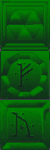
A little before and after pictures. There are a total of 5 ICE dungeon texture SETS. As you can see in the below images, they are mostly just recolored variants with different symbols. SIDENOTE: I presume they are Daedric symbols commonly seen in later games.
Here are three of the originals….
It took a bit to decide how much different, I wanted each to be. Ultimately, I just decided on to make them vary enough so that they would have their own appeal but maintain the overall theme. I haven’t seen these dungeons in game yet (never played far enough I presume). Once I complete all the SET files, I will do a test run through the game to see if I can find them (and others).
As I have stated in the past, one of the most taxing aspects of editing the TES:Arena textures is coming up with a unique take on the image within the constraints of the limited pixel and color count. While I was thinking about my methods and ways to be more efficient, it occurred to me that I don’t appropriately leverage my motivation. For the last 1 1/2 I have been working one texture at a time. This would exhaust my creativity for the day too quickly. I would waste a bulk of my time “finishing” said texture after I decided how I wanted it to look. All of the “fresh mojo” that I had when I started for the day was worn away by the time I got through a few (sometimes one) SET files. This is especially true with the most of the remaining SET files that have no defined look or image (i.e. barely recognizable as any thing but random colored pixels). Not only was that detrimental to the quantity of work completed in any one sitting, but it also deterred me altogether. There were days that I just didn’t have the energy or initiative to try and figure out a new take on what looked like white noise so I just wouldn’t decide to spend my efforts elsewhere.
Shotgun effect
To better capitalize on that “creative fronted”, I tried an experiment. I loaded up 18 SET files in GIMP. Then one by one, I worked on just getting the look I wanted for a small portion, enough to establish the look. I didn’t waste time completing the whole texture as that is really the easy and mostly mundane part. It worked quite well. Using this method, I was able to solidify my design for 16 SET files in just one day (really just a couple of hours). As I said the design is the hardest part with this project, and I wiped out almost half of the remaining SET textures left. Now, if I don’t feel particularly creative but still want to make progress, I can just finish up some of the ones I have already started (template on itself) and if I do…I may just be able to finish the other 16 or so.
Wanted a “unstable” wall look for this mine set
Keeping the icy feel
Just looking to avoid to many “rocks in the wall” SET files
This one is quasi faithful. I wanted to keep the chaotic look.
The original is just unworkable at this resolution.
Last week when I was lacking of motivation to work on the walls sets, I decided to fiddle with the interior doors and more specifically the wooden doors. Those are the ones that connect rooms and hallways and not ones leading out of buildings or dungeons. These particular doors are one single texture that is a door (the entry exit ones have borders that match the interior walls). That door occupies one square of dungeon space (all dungeons are square chunks of one texture). While in-game it appears that there are only two or three different wood door textures, there are actually over a dozen. It’s just that there are only 3 different textures among them. Here’s a sample of one image among multiple IMG files:
5 Doors don’t have to equal 1
What I don’t understand is why Bethesda used multiple files with the same IMG when space and memory was a concern back then. They could have easily used one file through the INF files (the ones that decide what textures to use on each level). However, this does give me an opportunity to add some variation to the ingame art. As such, as with walls and etc., I will make each door appearance different.
After wandering around in the game, I started feeling a need to go back and tweak some textures. I was just not happy with some of the combinations. Sometimes it’s just best to strike while the inspiration is strong. So I have spent quite a bit of time adjusting colors, cleaning up some of my more “questionable” decisions, and generally making them all play a little better together. I especially tried to tone down the floors and ceiling so they don’t clash or draw away from the walls. Some of the texture combos are much easier on the eyes now. For some of them, I removed the splotches or other weird marks that I had left to stay close to the original…the resolution/texture sizes are just to low to be that craz…er creative.
Breaking away
I have stopped trying to adhere strictly to the source material in interest of keeping the textures unique and fun. Additionally, I plan to add some “detail” to the wall sets that are just a group of plain walls (e.g. a small object on the wall). I want each wall image in a set to be unique but I’ll be sure to keep unadorned walls too to balance the aesthetics.
Floors darkened to not match the tables and added minor definition to the ceiling
Removed splotches and added shelves
Floor tamed, darkened walls and trim at top to better see the gold (now just need to do the ceiling)
As I have worked on several games, I have noticed various oddities. I have covered one before: unused assets. However, there are a few others. In the game TES:Arena, most SET files are reserved either for walls or for floors. The exception is this one:
Which gives us the below separate ingame dungeons:
Skulls on the Wall
Skulls on the floor
So far, it’s the only SET file to do that. Not sure what happened or why it’s like that. The main challenge with is that while I liked it on the floor against the dark walls, I don’t care for it as a wall texture. I’ll have to go back and tweak/balance it later. In theory, with further modding of the INF files (they determine which art files each level uses), it can be made so that a different file is used but I’m not inclined at this time to do that.
Ummm…what
Right off the bat, I’ll admit that my “working” copy of TES:Arena has been in use since I first started this project (several years now). It is now a Frankenstein-mess of my experiments. I expanded that executable file with an ancient program, expanded all the resource files, installed “WinArena” over top, fiddled with the INFs, etc. So I don’t know if the weird things I see in the game are my fault or not (easily enough to verify but I don’t really care that much).
Alot of mage guilds have this odd blank spot
Floating wall glitch
I even had a very odd problem of an Imperial City textures completely changing from one style to another. I just walked into a mages guild and came out to a completely different looking city. I wished I had made a video of that weirdness.
*This post was originally drafted in 2012 but never submitted. I have revised and updated it.
The next brief diversion was an even older game called The Elder Scrolls:Arena. It is the first game in one of my favorite video game series and I did play this one a lot when it first came out in ’94. I found a website that packaged it (and it’s sequel) in a neat, easy to install package. But, the low resolution graphics (320 x 200…trust me it’s very low) were so pixelly that it was hard to play and enjoy for me, particularly in the cities where anything in the distance was just a blob of small blocks.
Mods?
After some quick checking, I found that there were NO graphic altering mods out there. No one on the forums seems to think it was even possible. I found that hard to believe and felt the “challenge bug” nibbling at my toes. I wanted to find out how to do it. But I only got as far as checking how the files were stored (container file ending in .bsa). I did find that someone attempted to remake the game (didn’t get finished). It claimed to allow you to extract the art file out of the BSA file for you. BUT in actuality, it converts them to a common image format that the original game can not recognize and thus was not a viable option. Due to real life busyness (yes I mean busy-ness), this too faded to the background. Eventually, I did come back to it later (much like Darkstone) and succeeded in extracting all the files (using a old program).
Original screenshots
You did what?
Even though the image files were not in any common standard format, I figured out how to open them in GIMP (free editing software). This involved loading the images as RAW images with a offset header of 12 (think “ignore first 12 bytes of file”) and then loading a special palette files. I could then save it as a RAW image. The drawback to this method was that for images that had the 12 bytes that needed to be ignored (all the IMG files), the saved image wouldn’t have those bytes. That meant that I had to (BRACE YOURSELF) open the file in a hex editor (think super nerdy ), copy all the bytes, then open the original file and paste the copied bytes over starting at byte 13. Then, I tossed that file in main file directory as the game. The only way to see how it worked was to load the game and look for the texture. It was a overly cumbersome process that eroded my enthusiasm and by the time my “interest” (i.e. attention span) waned, I only completed 8 textures. Although I moved on to a different project, I came back once in a while to do a texture or two. I deluded myself in thinking that over time (probably decades), I would eventually finish it.
Progammer in Shining Armor
It wasn’t until Hallfiry released his “Arena Modding Suite” that the project took off in a major way. His tool not only unpacked the entire BSA resource file (BSA = Bethesda Softworks Archive) but converted most of the textures into PNG files for easy editing. Afterwards, it could be used to “repack” the BSA easily without destroying the “working folder” and converting the files back to the original format. Besides some textures that used a funky compression, it had removed the technical barriers to changing images in the game. Now to date, I have completed 126 of 172 SET files (wall texture sets) with 12 additional ones that aren’t even used in game. The two biggest challenges for me now are: making unique interesting textures that work well in game (after having already made 126 of them) and figuring out how to do some of the more organic textures to match my style (since the pixel dimensions are very limited). 64 x 64 does limit the amount of creativity I can use.
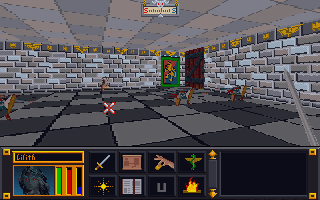
I spent some time this week searching in-game for textures yet to be done using a pre-edited overpowered save file so I could roam unimpeded. I looked for dungeons, cities, wilderness, etc. that hadn’t yet been retextured. The side effect to this is that I found places where the textures WERE done but I had never seen them in-game or at least not in combination with other textures. From this I learned that some textures don’t work as well in-game as I hoped.
Proud Poppa
However, there are many that I feel are just right (or close enough for me to be happy). These I feel keep a unique appearance AND work well not only for their intended purpose but also with other textures. For example:
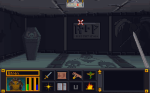
Tomb – cleaned up but still true to the original ( I think…it was so blurry so what may have been an angel is now a reaper)
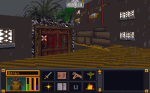
Wilderness tavern – one of my favorite combos (with the snow)
Mage guild – cleaner appearance still rings true to the original
Avert your eyes
Of course, they all can’t be winners. I expected that I would have to go back and tweak later, but some textures combos were just horrible. To be fair to myself, I had two limitations: one, I was trying to make each texture unique and two, some textures were awful to begin with (one of the mage guild textures is a complete mess). These will be easy to tweak up though as all the hard work is already done.
Beside the awful table (which I may leave depending on other changes) the pink blotches have to go
Uh…yeah
it’s like wearing a plaid shirt with a polka dot hat and paisley pants
Dirty walls and floors
I have starting tackling some of the vague pixelly mess of some wall and floor textures that I have been avoiding. The limitations on resolution and colors will probably force me to deviate from “source” more than I care but it can’t be avoided. There are so many in the DW series alone (A through S). The reason I started looking for textures in-game was so I could see the context in which the textures were being used.
While I haven’t found my most recent version of the Torchlight mod, I did find my proof of concept file for a texture mod of the pc game Darkstone. Although all the Darkstone media assets are stored in “container” files like my other projects, Darkstone art files are a little different when extracted. Unlike Torchlight and Morrowind that have individual files for each image, Darkstone has what I call “image sheets”. I posted about it before but that was quite some time ago. Basically, it means that one “sheet” will be composed of many images fit together like a puzzle and in reality is actually a dozen or so art assets in one “sheet”.
Town building image sheet for Darkstone
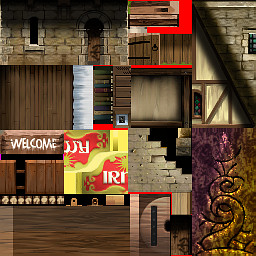
Arena and Minecraft “sort of” do something similar. Both of them use a combination. Arena has multiple file types for art assets (some undecipherable) which include IMG files (single image) and SET files (multiple art assets stacked on top of each other in one picture). Minecraft *has/had individual files for items and such and one big image sheet for all environmental “blocks”.
*Newer versions of Minecraft are all separate image files
Terrain file for Minecraft
Wall SET for Arena equipment shop
The difference in the Darkstone “image sheet” is that all images are not the same size. It takes a little extra experimentation to figure out where some textures start and where some end especially for textures like grass and sand that blend together naturally already as it is. Depending on my needs, I’ll either use the solid blocks of color or shapes (number, letter, etc).
As I said, my Darkstone work was merely in the proof-of-concept stage. I had only completed 1/2 of one texture sheet. It was enough to redo some grass and road as well as the trees of only the beginning town (textures aren’t shared across levels). After finding my “sole” texture file, I fiddled with a little and worked on the rest of the grass and road for the level (which included a second image sheet) . However, it is all in the draft stage and needs major cleaning up before I would be happy with them.
Original game
Figuring out the stone textures and where they are in the game
New stone tiles with other tiles now complete
I have revised the cobble stone to be less “busy”. I tried to use the same style as the other colors (outlines lighter than interior color) but the game keeps altering the colors so I think it can’t handle subtle shades of gray and black. Whenever I get back to this project, I’ll clean up the lines and make sure the grass isn’t so…squiggly.
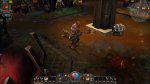
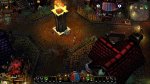
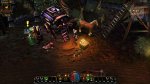
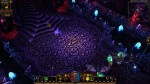
Several years ago when I first started messing around with computer graphic art, I tested out visual concepts on a PC game called Morrowind (the third in the Elder Scrolls series that Arena started) . Although Morrowind was where I tested the waters, it was another game called Torchlight that became the focus of my first big project I “cleverly” decided to call Toonlight. Initially, I tried to change the art assets in bulk by using the various filters built into the GIMP software. However, while the end results were interesting, I didn’t find them very pleasing aesthetically.
Original Town texture
After experimental “filtering” in GIMP
More town filtering
Fortress level filtered
Palace filtered
So I took those results and experimented a little more by testing different tweaks and changes. Eventually, I narrowed down the look I wanted to pursue. Since I found the game art interesting but bland, I decided my goal would be to make it more vibrant and add cell-shading style lines. Surprise, Surprise 😉 I just felt that the WOW-esque muted coloring made the environment less interesting, washed out and a lot of detail. So I started adding “black outlines” and redoing each texture by hand. Then I would test them in-game. Each art set for the various types of levels were already separated into individual folders labeled “levelsets”, so I worked my way from one levelset to another. I was even close enough to completion that I thought I could beat Torchlight 2 being released. I had reworked almost all the level artwork and many of the monsters and props. However, I was in the midst of moving and my motivation waivered and the mod drifted down the priority list.
An original sunken temple wall
another sunken temple wall retextured
Recently, when I started recollecting all my data from various hard drives (including 2 that were on their deathbed, CDRs and memory sticks, I discovered my art files for Toonlight and my other “on hold” mod, Darktone, were missing and the only thing left was a very early version of my Toonlight mod. Although this is a tragedy for most, I had learned so much from working on that project (and had so much fun) that I don’t consider the time wasted. On top of that, upon further review, I found myself not overly satisfied with the few levels I did recover. The initial mine levelset now seems too sloppy for my tastes, the crypts are a little too green and non-descript in a few areas, and the sunken temples levels are a TOO busy. Only the lava level still pleases me but some of it didn’t get recovered. I’m still searching for them but worse case scenario, I have enough recovered to springboard myself back into the project. With that said, I’m focused on my Arena mod. Once I have gotten as far as possible, I will resume my other projects.
Mines retextured…I like it but needs some more love
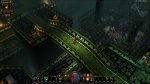
Over the bridge and to the crypt
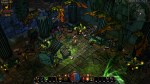
Sunken but busy
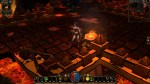
Lava level…I still like it
So where does that leave me…same as before. I still plan on completing it. One aspect all my art mods have in common (except Minecraft) is that they are older games that I’m doing for my personal enjoyment. I don’t feel the need to adhere to a timetable before the games become “irrevelant”. Arena was released over 20 years ago!
























 Art In Pinkerton